
Revise[Production]
production.revise.id
From accepted manuscript to published article.
Revise[Production] handles everything after an editor says yes: typesetting the article into publication-standard galleys, running the proofreading cycle with authors, and producing the final PDF and XML you deposit and publish. Two jobs that used to need two systems, in one place.
Module one
Galley Production
Send us the accepted manuscript and we typeset it to your journal's template, returning publication-standard galleys — a typeset PDF and valid JATS XML from one source, so the two cannot drift apart. No one on your team has to learn XML or buy a typesetting licence.
Typeset to Your Template
We set the article to your journal's own template — article-type tab, running heads, two-column body, and figures placed in position rather than dumped at the end.
Complete Article Metadata
Titles, authors, affiliations, ORCID identifiers, and funding are captured as structured fields, so the article-level metadata is complete before it is deposited anywhere.
References Resolved, Not Re-Keyed
References are filled in from their Crossref DOIs, so nobody has to re-type the manuscript's bibliography.
Standards Validation
Every galley is checked against the JATS requirements a deposit expects before it reaches you, so it is ready when you deposit it.
Complex Tables Kept as Tables
Multi-level and merged tables are structured properly and carried into the XML rather than flattened into images.
PDF and XML Delivered Together
The typeset PDF galley and the JATS XML come back from the same source, ready to deposit, index, and publish.
The output
A galley we produced, exactly as it published.
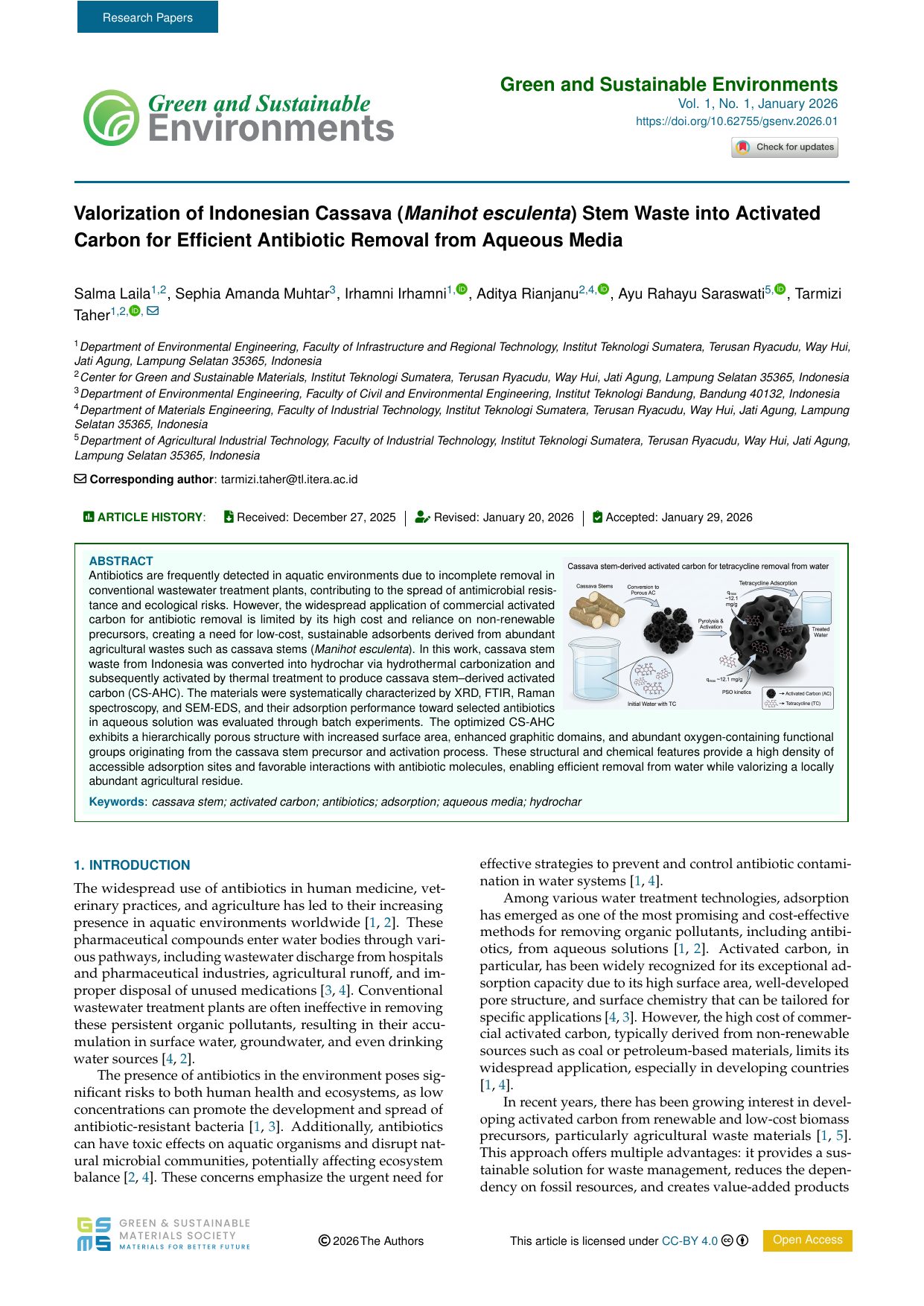
Journal furniture, in its expected place
Article type, journal title, volume and issue, DOI, and the publishing society mark — where a reader and an indexing service both look for them.
Crossmark and ORCID
An update badge on the first page, and an ORCID link against each author who has one.
Article history
Received, revised, and accepted dates carried across from the editorial record rather than re-keyed.
Abstract block and keywords
Abstract, graphical abstract, and keywords set as their own structured block rather than as running text.
Licence and access status
Copyright line, CC BY 4.0 licence, and open-access status stamped on the page itself.
Module two
Proofreading
Run the correction cycle with authors in the browser, and close it out with a publication-ready file.
Inline PDF Annotations
Authors mark corrections directly on the proof in the browser. No annotated PDFs coming back by email.
Author Query Management
Queries and answers stay in one thread against the article, so nothing is settled in a side conversation.
Correction Audit Trail
Every correction is recorded with who asked for it and who applied it.
Automated Proof Generation
Proofs are generated from the current article record, so what the author sees is the file of record.
Payment & Invoicing
Article-processing charges, where a journal levies them, are invoiced and tracked alongside the article.
Status Flow Management
Each article moves through a defined production status flow that the whole team can see.
Why it matters
The correction cycle, without the email thread.
The usual round-trip
The proof goes out as an email attachment, and every correction comes back as one.
Several copies of the same PDF end up in circulation, and the current one is whichever inbox you happen to open.
Queries are answered in the body of a reply, so the answer lives in a mailbox rather than against the article.
It is hard to tell exactly what changed from one round to the next.
In Revise[Production]
The proof opens in the browser, and corrections are marked on the proof itself.
One proof of record, generated from the current article, so there is no newer copy somewhere else.
Queries are threaded against the passage they concern and stay with the article.
Every correction is recorded with who asked for it and who applied it.
Workflow
From acceptance to publication.
An accepted manuscript arrives from Revise[Submit] with its metadata already attached.
There is nothing to export or re-type. Acceptance is the single handoff in the whole workflow, and it happens inside one system.
Typeset into galleys
We set the article to your journal's template and structure it into JATS; references are filled from their DOIs.
Validated
The article is checked against the standards a deposit requires while it can still be corrected cheaply.
Proof to the author
The generated proof goes to the author in the browser, with queries attached to the passages they concern.
Corrections closed out
Corrections are applied and recorded, and the query thread is closed against the article.
Published and archived
Final XML and PDF come out ready to deposit, publish, and archive.
Before acceptance
Revise[Submit]
Submission intake, peer review, revision rounds, and editorial decisions — everything that happens before a manuscript reaches production.
Bring your production to Revise
Tell us how many articles you publish a year and how you produce them today. We'll show you where Revise[Production] would help — and tell you honestly if it wouldn't.
hello@revise.id
usually answered within one working day